
Voice types in singing — soprano, alto, tenor, bass, and the names in between — are useful shorthand for repertoire and choir seating, but they are not stamped on your throat at birth. A vocal range map shows something more concrete: which notes you actually sustained in a session, how steadily you hit them, and a rough VOICE hint derived from that span. This article walks through what those four familiar labels mean, how Vocal Range Test turns your sung range into a VOICE readout, and how to read the map without treating a browser chip as a voice teacher. If SCORE, LIVE, and the heatmap are new to you, start with What Is a Vocal Range Map?.
What Soprano, Alto, Tenor, and Bass Actually Describe
In classical and choral training, voice type bundles several ideas: the notes you can reach, the register where your tone feels easiest (tessitura), how heavy or light the sound is, and where your voice changes color between chest and head (passaggio). Range is only one piece. Still, range is the part a map can see — so it is worth knowing the usual boxes.
| Voice type | Typical span (approx.) | Common pairing |
|---|---|---|
| Soprano | C4 – C6 | Often female |
| Mezzo-soprano | A3 – A5 | Often female |
| Alto (contralto) | F3 – F5 | Often female |
| Tenor | C3 – C5 | Often male |
| Baritone | A2 – A4 | Often male |
| Bass | E2 – E4 | Often male |
These ranges overlap heavily at the edges. A singer whose top note sits around B4 might be labeled tenor or high baritone depending on timbre and passaggio — not just the highest note on a chart. Pop and musical theatre use the labels more loosely; for daily practice, “what key lets me sing this song without strain?” often matters more than a formal category (Voice type — Wikipedia; Vocal Ranges — Yale University Library).
Soprano usually means a bright, higher female voice comfortable in the staff above middle C. Alto (or contralto) sits lower, with a richer middle register. Tenor is the higher male category in many choirs; bass the lowest. Between them sit mezzo-soprano and baritone — the two labels Vocal Range Test also checks when your span overlaps more with those bands.
None of this replaces a teacher listening in the room. It does give you vocabulary when a coach asks “are you living in tenor repertoire or baritone?” or when you wonder why alto parts feel easier than soprano lines even though you can squeak out a high note once.
What the Range Map Measures — and What VOICE Is Not
Open Vocal Range Test and sing for a minute. The chromatic strip fills with color; the stats row shows SCORE, LIVE, RANGE, and VOICE. Only the last two feed directly into voice-type guessing — and even they answer different questions.
RANGE is not “every pitch the mic ever heard.” The tool looks for sustained singing: frames where your level and intonation pass stricter gates than the heatmap uses. Brief squeaks, whispered passes, or one-off slides may show on LIVE without moving the cyan and magenta RANGE lines. Those lines mark the lowest and highest sustained steps in the session — centered in each semitone column, cyan for the bottom, magenta for the top. The RANGE chip repeats the same note names (for example G3–D5).
VOICE compares that sustained span to six reference bands — Bass, Baritone, Tenor, Alto, Mezzo-Soprano, and Soprano — and picks whichever band overlaps your RANGE the most (by semitone count). If your session span is G3–D5, overlap is larger with Alto or Mezzo-Soprano than with Soprano or Bass, so VOICE might read Alto even if you once touched F5 on a pushed note that never sustained.
That overlap rule is intentional: it mirrors how pedagogy charts draw broad rectangles, not how a clinician diagnoses. Richard Miller’s The Structure of Singing and Johan Sundberg’s The Science of the Singing Voice both stress that classification needs timbre and passaggio — material a range map cannot hear (SingWise — vocal range, registers, and voice type glossary).
RANGE vs the heatmap — read both
The Accuracy and Coverage toggles on the strip answer “how in tune?” and “how often did I sing here?” (The Vocal Intonation Map). VOICE ignores color. You can have a wide RANGE because you shouted red, unstable notes at the edges — still counted if they sustained long enough — while your comfortable green core sits much narrower.
Before reading VOICE, glance at Coverage: a more opaque column means more accepted frames relative to the busiest note in this map. Column height is not the value. Combine that with Accuracy and your recording. A green cluster does not prove tessitura: comfort, timbre, and endurance need listening and your experience across sessions.
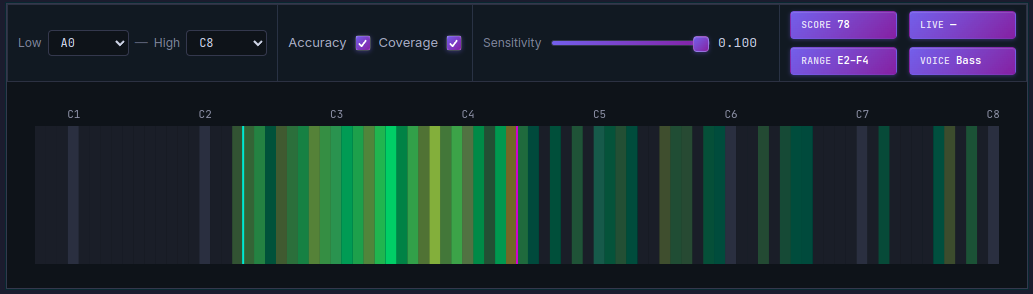
VOICE picks the reference band that shares the most semitones with your sustained RANGE — not the single highest note you touched.
A Session Protocol: Finding a Useful VOICE Hint
Treat VOICE as a snapshot label for today’s sustained span, not a lifetime ID. The steps below take about ten minutes and align with how the tool’s RANGE logic is built — long enough holds, enough steps, minimal forcing.
Step 1 — Warm up and set the window
Hum and lip-trill for three to five minutes (How to Find Your Vocal Range has the same warmup idea). In Vocal Range Test, set Low and High so the strip covers more than your expected span — default width is fine on a first pass. If the mic is quiet, raise Sensitivity slightly; if ghost columns appear from room noise, lower it.
Step 2 — Sing sustained steps, not a race
On a comfortable vowel (ah or ee), move up and down in half steps. Hold each step two to three seconds at a steady volume. The RANGE engine needs continuous frames; rushing through chromatic scales in one breath leaves gaps. Include your passaggio slowly — where chest thins into head — without pushing. Forced notes may widen RANGE while turning the heatmap orange at the edges.
Step 3 — Read RANGE before VOICE
When you stop, note RANGE first: the cyan/magenta lines and the chip text. Does the span match where you felt comfortable? If RANGE stops at C5 but you “know” you can hit E5 in falsetto, ask whether you sustained E5 or only slid through it. Falsetto can count for range mapping if you hold it steadily; a flick does not.
Step 4 — Cross-check VOICE with Coverage
If VOICE says Tenor but Coverage shows most of your time in a baritone-shaped band with only a thin spike upward, you may be a baritone who reached high once — or a tenor who has not explored the lower register yet. Run the same protocol again on another day; voice type hints stabilize when RANGE and Coverage tell the same story twice.
Step 5 — Log context, not just the label
Write down date, RANGE, VOICE, SCORE, the exercise and gate settings, and how your voice felt. Tessitura is the register you can use comfortably over time. The map supplies nearest-note centering and relative coverage, but it does not measure effort or fatigue. Bring both the recording and those notes to a teacher when discussing voice type.
When the Map Says One Thing and Your Ears Say Another
VOICE differs from your usual classification. The label depends on the sustained span and the overlap rule, not on your timbre or choir assignment. Repeat a comfortable, complete up-and-down exercise under the same conditions before comparing labels. Skipping lower notes does not predict that the result will become Alto; the direction of a label change depends on the full span.
VOICE reads Tenor but high notes only work in falsetto. Classical tenor repertoire expects a connected upper register; the map cannot separate chest from falsetto timbre. Use Vocal Pitch Monitor on the same dashboard to see whether your line breaks cleanly at the passaggio while RANGE still counts both registers.
VOICE flips between adjacent types across days. Normal. Hydration, sleep, and warmup change how far you sustain. Borderline spans — overlap between tenor and baritone reference bands, or mezzo and alto — flip with a semitone of RANGE movement.
You sing pop and never think about voice type. Fair. Transpose songs into the green core of your map; let VOICE satisfy curiosity only. When you join a choir or audition for a role, bring RANGE screenshots and a short recording — labels plus sound beat labels alone.
Gender presentation also matters socially for part assignment, but the tool’s reference bands are range rectangles from pedagogy, not gender detection. Any singer whose sustained span overlaps the tenor band may see Tenor regardless of how they are cast on stage.
Practice with MusicalBoard Vocal Range Test
Vocal Range Test runs locally in the browser with the same pitch pipeline as Vocal Pitch Monitor, but trades a scrolling time graph for a compact vocal range map: per-note Accuracy hue, Coverage opacity, session SCORE, real-time LIVE, sustained RANGE, and the VOICE overlap hint.
For voice-type exploration specifically:
- Allow the microphone and warm up briefly.
- Set Low/High to frame your full speaking-to-belting window.
- Sing sustained half steps up and down; avoid forcing edge notes.
- Check RANGE (cyan/magenta lines) and the Coverage pattern before reading VOICE.
- Repeat on a second day; compare whether VOICE and RANGE agree.
If unstable steps dominate the map, fix intonation before debating labels — Vocal Scales with Live Pitch Feedback pairs scale drills with the live graph so problem notes show up before the next range pass. Virtual Piano helps lock a weak step before you re-run the map.
VOICE is a rough hint for curiosity and lesson prep, not a medical or casting diagnosis. When the label matches how you already choose keys and parts, it confirms what your body has been telling you. When it surprises you, that surprise is a useful question to bring to a teacher — with RANGE, SCORE, and a heatmap screenshot in hand, not instead of their ears.