
After finishing a vocal range test, the screen fills with a color-coded heatmap. Some notes read green or yellow, others orange or red, and some show only faint coverage fill or no color at all. What many singers don't realize is that this heatmap has two distinct channels — one for accuracy and one for coverage. Each channel answers a different question. Accuracy answers: "How precisely did you hit that note?" Coverage answers: "How often did you sing it?" Reading both together gives you a three-dimensional picture of your vocal condition. This article explains what each channel means, how to read the heatmap colors, what patterns commonly appear, and how to translate that information into concrete practice decisions. Use MusicalBoard's Vocal Range Test alongside this article to combine theory with hands-on exploration.
The Two Channels of the Intonation Map: Accuracy and Coverage
The intonation heatmap summarizes data from every note produced during the vocal range test, organized along two dimensions.
Accuracy channel summarizes distance from the nearest equal-tempered note, using the lower-quartile score for each note. Coverage shows relative accepted-frame count by opacity. Neither channel checks the melody’s intended notes: an accurately centered wrong semitone can look green.
Coverage channel: Indicates how frequently each note was produced during the test — proportional to how many times (or for how long) that note was detected. A note with high coverage was sung often; a note with low coverage appeared rarely.
On screen, accuracy is shown by hue (color) and coverage by how densely each bar is filled (opacity). With both Accuracy and Coverage toggles on, hue and fill strength are layered together.
The reason these two channels exist separately is that frequently used notes are not necessarily accurate notes. A singer might visit a particular register constantly while singing with inconsistent intonation there. Conversely, a note that appears rarely might be sung with perfect precision when it does appear. Separating these dimensions is what makes the feedback genuinely useful.
The Accuracy Channel: Did You Hit It Cleanly?
The accuracy channel reflects pitch precision on each note. Higher accuracy reads green; mid-range accuracy yellow or orange; lower accuracy red. Notes you did not sing stay empty.
Accuracy is calculated using a real-time pitch detection algorithm (Vocal Range Test uses a fundamental frequency extractor in the YIN algorithm family). The detected fundamental frequency is compared to the center frequency of the corresponding semitone; how far it deviates determines the accuracy score. A perfectly in-tune note is within ±0 cents of center; larger deviations reduce the accuracy reading.
Patterns to look for in the accuracy channel:
- Uniformly green or yellow: Consistent pitch precision across that register — stable intonation.
- One note standing out red or orange in an otherwise green area: High accuracy overall except for a single note — that note is a target for focused drilling.
- Accuracy declining toward the top or bottom of your range: A natural softening of precision near the edges of your range; expand carefully rather than pushing.
The Coverage Channel: How Often Did You Sing It?
The coverage channel shows how frequently each note was produced during the test. It is not about pitch accuracy — it is about vocal presence.
Notes with high coverage (densely filled bars) were visited often during the test. This may reflect a comfortable register you naturally gravitate toward, or simply that the test format kept you in that range longer.
Notes with low coverage (faint fill or empty cells) appeared rarely or not at all. This often signals a register that feels difficult or that you tend to avoid.
Coverage reveals the biases in your singing habits. Many singers unconsciously gravitate toward their comfort zones, resulting in coverage concentrated in certain bands and absent from others.
Why Both Channels Must Be Read Together
Looking at only accuracy or only coverage gives an incomplete picture. The full story emerges when the two channels are compared.
Consider these four combinations:
| Coverage | Accuracy | Interpretation |
|---|---|---|
| High | High | Sing it often and accurately → strength register |
| High | Low | Sing it often but inaccurately → highest priority for improvement |
| Low | High | Sing it rarely but accurately when you do → latent potential to develop |
| Low | Low | Rarely attempted and inaccurate → still developing |
The "high coverage, low accuracy" zone deserves the most urgent attention. It is the register you use regularly in actual singing — which means listeners hear unstable pitch there most frequently. This is where improvement yields the highest return.
The "low coverage, high accuracy" zone is potential waiting to be used. Accuracy is already there; the task is simply to increase coverage — to make that register a more regular part of your singing.
Reading Heatmap Colors: Hue for Accuracy, Fill for Coverage
The two channels are not read the same way with "pale vs. dense."
Accuracy (hue) uses the lower 25% score for a note, or the lowest score with fewer than four samples. It emphasizes rough moments rather than simply copying the session mean. The reference is the nearest equal-tempered note, not an imported score or the intended melody.
- Green or yellow: High pitch precision on that note — the lower-quartile score was favorable relative to the nearest equal-tempered note.
- Orange or red: Low precision — a low lower-quartile nearest-note score; check the trace and audio for drift or detection errors.
- Empty cell: You barely sang that note.
Coverage (opacity) is the note’s accepted-frame count relative to the most-visited note in the current map. Compare how densely columns are filled, not their height. Changing the exercise, Low–High, or Pitch gate can change that distribution even without a change in your voice.
- Densely filled: That note was produced frequently during the test.
- Faint fill or empty: Few or no frames passed the current checks.
When reading the heatmap, look at the big picture first: for accuracy, which registers are green vs. red; for coverage, which bands are filled densely vs. faintly.
Practical Case 1: Middle Register — Confirming a Strength
For many singers, the most natural and comfortable register is the middle range. This zone often shows high accuracy and high coverage together.
If the middle register (for example, C4 to G4) reads green or yellow on accuracy and is densely filled on coverage, that is your strength register — you sing there often and you sing it accurately. Build your practice repertoire around it, and when choosing new repertoire, prioritize songs that include this range to create consistently confident performances.
Once the middle register strength is confirmed, use it as the foundation to expand upward and downward. Vocal Pitch Monitor allows you to watch the pitch stability of notes outside your comfort zone in real time, giving you precise feedback as you extend your range gradually.
Practical Case 2: High Register — A Zone Needing Focused Work
Faint coverage combined with red or orange accuracy in the upper register is extremely common. It means you rarely visit that register, and when you do, you are not in tune.
Two factors reinforce each other here. First, the register feels technically demanding, so you naturally avoid it (low coverage). Second, because you attempt it infrequently, repetition-based learning hasn't accumulated — so accuracy stays low. The two problems compound.
An approach for improving the high register:
- Start one or two semitones below the ceiling of your current comfortable range.
- Work upward one semitone at a time, practicing each note thoroughly before moving on.
- At each pitch, repeat until the Vocal Pitch Monitor graph holds steady on the target line.
- Only advance to the next semitone once the current one is stable.
This is slow — but it is the only approach that raises both coverage and accuracy at the same time. Forcing high notes without the precision work makes coverage denser while accuracy stays red on the heatmap.
Practical Case 3: One Note with Low Accuracy in an Otherwise Strong Register
Sometimes overall accuracy is high and coverage is even, but one single note stands out red or orange on the accuracy channel. For instance, the range F3 to C5 is uniformly green or yellow except for F#3, which reads red.
This is a precise signal. That one note has a specific intonation problem. Focused drilling is the most efficient response.
Drill method for a single problem note (here, F#3):
- Play F#3 on Virtual Piano.
- Listen to that pitch and sing the same note on an "ahh" vowel.
- Watch Vocal Pitch Monitor to see whether the pitch graph lands on the F#3 line.
- Repeat 10 to 20 times, then run Vocal Range Test again and check whether F#3 has shifted toward green or yellow on the accuracy channel.
The heatmap functions as a map showing exactly where to practice — not a general report, but a targeted drill list. Focused work on a specific note advances you far more quickly than repeating the whole range.
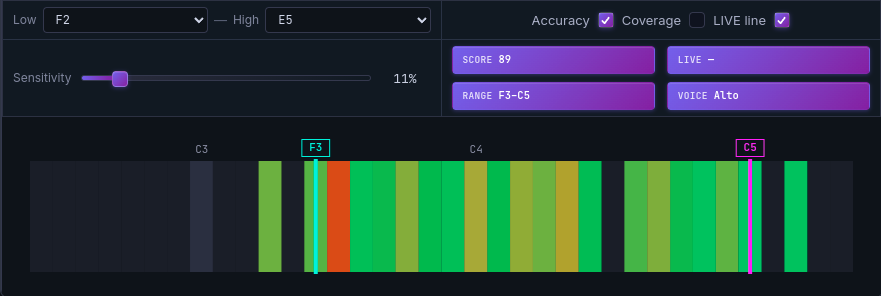
When one note appears red or orange against an otherwise green or yellow accuracy map, that note is the target for concentrated drilling.
The Relationship to the SCORE Indicator
The Vocal Range Test screen shows a SCORE figure alongside the heatmap — a single number summarizing overall vocal quality.
SCORE is derived from the combined accuracy and coverage data. Higher accuracy across a wider range produces a higher SCORE. It is useful for tracking practice progress: if today's SCORE is higher than yesterday's, vocal performance has measurably improved. A lower SCORE indicates either a difficult day or that more training is needed.
That said, SCORE alone is less informative than the two heatmap channels together. When SCORE is low, check which registers read red or orange (accuracy) and which are faint or empty (coverage) — that immediately clarifies the path forward.
Using Vocal Range Test with Vocal Pitch Monitor
MusicalBoard's Vocal Range Test begins the moment you grant microphone permission. Real-time pitch detection runs throughout the test, and the heatmap with SCORE appears when it concludes.
Effective ways to use the two tools together:
Establish a baseline before each session: Run Vocal Range Test at the start of a practice session to see which notes read red or orange on the accuracy channel today.
Set today's practice priority from the heatmap: If the accuracy channel shows a weak register or a single problematic note, that becomes the center of the session.
Use Vocal Pitch Monitor for deeper analysis: Vocal Range Test provides a broad overview of the entire range. For understanding exactly how far off-pitch a specific note is, and in which direction, Vocal Pitch Monitor gives real-time detail that the heatmap cannot. Use Vocal Range Test to identify which note has the problem; use Vocal Pitch Monitor to see precisely how the pitch moves on that note.
The relationship between the two tools: Vocal Range Test is a wide-angle diagnostic tool; Vocal Pitch Monitor is a close-range real-time feedback tool. Diagnose, then train with live feedback, then measure change with Vocal Range Test again. That cycle is the most efficient self-training loop.
Recording with Singing Recorder at the end of each session preserves a date-stamped record of progress. Listening to a recording from a month ago alongside today's is a more visceral form of progress tracking than any number.
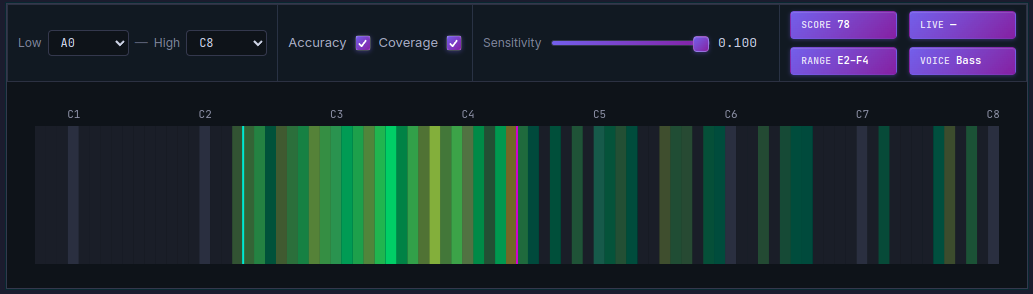
Analyzing accuracy and coverage together in the Vocal Range Test heatmap gives a concrete direction for practice. SCORE summarizes the result as a single number.
References
- Intonation (music) — Wikipedia
- YIN, a fundamental frequency estimator for speech and music — de Cheveigné & Kawahara, Journal of the Acoustical Society of America (2002)
- Vocal Range — Wikipedia
- Teaching Intonation to Beginning Musicians — NAfME
- Why Are You Singing Out of Tune and How to Fix It — London Singing Institute