
Vocal intonation is how accurately you reach and sustain your intended notes while singing. It's a slightly different concept from pitch — which just refers to how high or low a sound is — and understanding that difference can really sharpen the direction of your practice. In this post, I'll clarify how the two terms relate, walk through the real reasons intonation tends to go off, and cover a step-by-step approach to fixing it using tools like the Vocal Pitch Monitor — all of which run directly in your browser.
Pitch vs. Intonation — Similar, But Not the Same
These two words get used interchangeably a lot, but they mean slightly different things.
Pitch is the actual highness or lowness of a sound. It's determined by how fast your vocal cords vibrate and can be expressed as a frequency — A4 at 440Hz, for example. When someone says an instrument is "in tune" or "out of tune," they're talking about pitch.
Intonation refers to the pattern of pitch accuracy — how well your pitch aligns with the target note throughout a performance, and how steadily it holds there. Good intonation means you're not sharp or flat, and that the movement between notes is clean and consistent. According to Wikipedia's entry on musical intonation, vocal intonation carries a broader meaning than any single note's pitch, and covers deviation in both the sharp and flat directions.
The short version:
- Pitch → what frequency is this note right now
- Intonation → how accurately and consistently am I hitting my target notes throughout the song
In practice, if you hold a note and it drifts flat toward the end, if you arrive slightly under the target on high notes, or if fast passages feel like the pitches are blurring together — those are all intonation problems. You'll often hear people describe this as "unstable pitch," which is really just another way of saying the same thing.
Why Your Pitch Wavers When You Sing
Intonation problems don't come from a single source. There are broadly three places they can originate.
You're Not Hearing Your Own Voice Accurately
The voice you hear while you're singing isn't the same voice everyone else hears. Bone conduction adds low-frequency resonance that makes your own voice sound richer and slightly lower to yourself than it actually is. This is why someone can feel entirely on pitch and still be singing flat — their internal reference is off. When that's the case, correcting by ear alone is really difficult. You need an external, visual tool to check what's actually happening.
Breath Support and Cord Control
Not enough air support causes the vocal cords to stay thicker than they need to be, which pulls the pitch flat. Too much air pressure and you overshoot sharp. This is especially noticeable in the passaggio — the middle register transition zone that every voice goes through. The moment the balance between airflow, cord thickness, and vowel shape breaks down is usually the moment a note goes off. Starting to sing before you're properly warmed up doesn't help either; muscles that aren't flexible yet make clean interval movement harder.
Ear Training Still Has Room to Grow
If you don't have a clear internal model of what the target pitch should sound like before you sing it, it's hard to notice — let alone fix — when you're drifting. Intonation is as much an ear training problem as it is a technique problem. Work on one without the other and you'll keep hitting a ceiling.
This is where the Singing Recorder's instant playback comes in handy — recording and immediately listening back lets you compare what you thought you were singing with what actually came out. Repeating that loop helps your ear build a more accurate internal reference over time.
How to Actually Improve Your Intonation
Step 1 — See Where You're Off Before Trying to Fix It
If you don't know where you're going wrong, you don't know what to fix. The fastest way to find out is to watch your pitch in real time as you sing.
Vocal Pitch Monitor works as soon as you allow microphone access in your browser. No installation, no account, no cost. The vertical axis shows note names (C, D, E…) and the horizontal axis shows time, so you can immediately see whether the line stays flat when you hold a note or starts wandering.
Once you've used the real-time graph to spot where things get unstable, the Vocal Range Test is a good next step for tracking how much things have improved. It gives you a SCORE based on pitch accuracy alongside your vocal range, so you have an actual number to compare before and after practice sessions. If the graph shows you the pattern, the score summarizes how far that pattern has shifted.
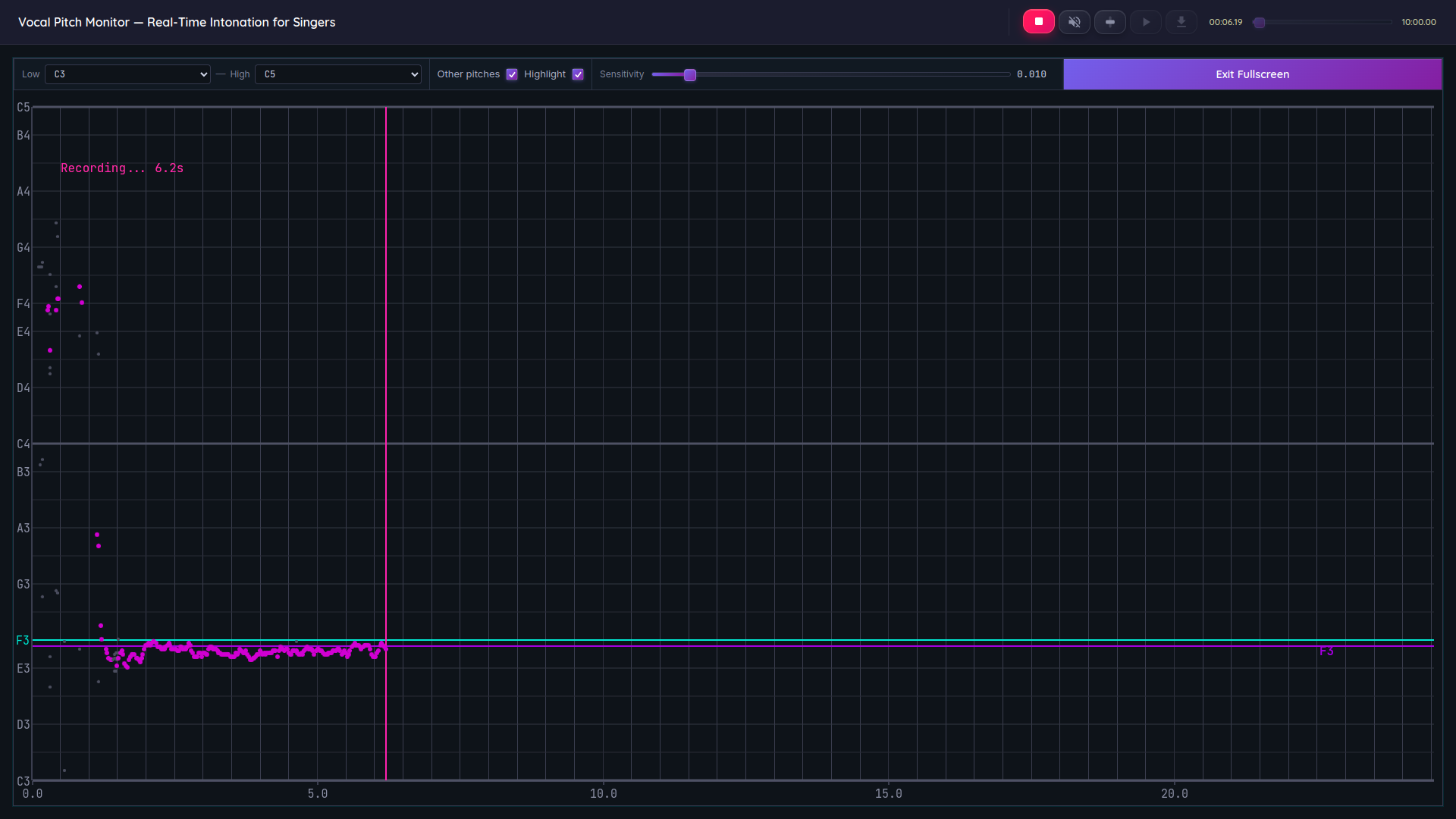
The Vocal Pitch Monitor in action. You can see in real time exactly how far the line deviates from your target note.
Specific things to look for:
- When you start a note, does the line land immediately on the target, or does it slide up from below?
- While you're holding the note, does the line stay flat, or does it sag toward the end?
- If you're using vibrato, does the waveform oscillate at a consistent rate and width?
Step 2 — Tune Your Ear With a Drone
A drone is a sustained single reference pitch played by a piano or an app that rings continuously underneath your voice. Singing over it trains both your ear and your voice to lock onto that pitch.
Find a reference note like A4 in Virtual Piano, click it, then try to match it with a sustained "ahh" vowel. Run the pitch monitor at the same time so you can see how close you're actually getting — deviations of just a few Hz show up clearly on the graph. The more you repeat this, the clearer your internal benchmark for each pitch becomes.
Step 3 — Find Your Problem Notes in Scale Practice
Mindlessly running scales from top to bottom is less effective than identifying which specific notes give you trouble and targeting those. Open Vocal Scales, turn on the scale accompaniment, and sing through it with the pitch monitor running. Any notes that consistently drift away from the target line are worth isolating and drilling with the drone approach.
As suggested in NAfME's guide to teaching intonation to beginners, when the pitch graph starts getting messy, slowing the tempo down is usually the first move. Use the tap tempo feature in Online Metronome to match your current pace, then bring it back up gradually as your intonation stabilizes.
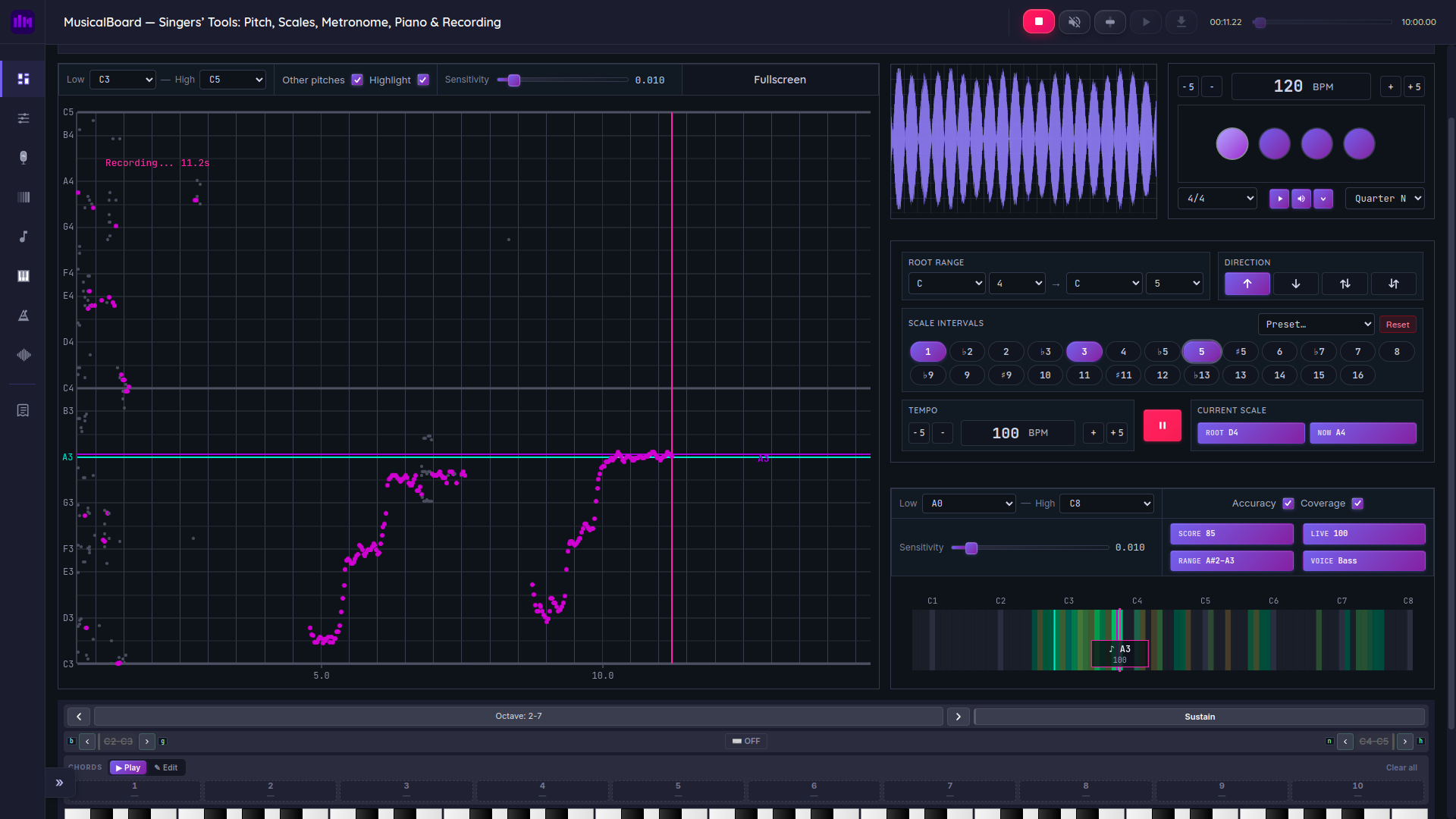
Running the scale accompaniment alongside the pitch monitor makes it easy to spot exactly which notes are slipping.
Step 4 — Use Recording for Honest Feedback
What you hear while you're singing and what a recording captures are genuinely different things. Bone conduction is filtered out in a recording, which means playback is much closer to what everyone else actually hears. As London Singing Institute points out, it's surprisingly common for singers to hear for the first time — through a recording — that they've been singing flat.
Singing Recorder handles recording, playback, and download all in the browser. The pitch monitor stays running during recording, so you get two rounds of feedback — once live, and again on playback. During playback, a moving marker on the graph tracks exactly where in the recording any given moment falls, so you can pinpoint the precise moment a pitch went off.
Things People Often Overlook in Intonation Practice
Skipping the warm-up. Jumping straight into middle or upper range without warming up means your cords aren't flexible enough yet for clean interval movement. A 5–7 minute warm-up — lip trills, humming, low-range scales in that order — makes a visible difference in how stable the graph looks.
Practicing past the point of fatigue. As K&M Music School notes from their a cappella coaching, a tired voice loses its pitch center. Three 20-minute sessions spread through the day will almost always beat a single hour-long block for most people.
Repeating the whole song instead of the problem spots. Running from beginning to end means spending most of your time on the parts that are already working. The pitch monitor shows you where things slip — drill those sections, not everything else.
Only doing scales and skipping interval training. Scales are important, but real songs are full of jumps — thirds, fifths, octaves. Arpeggios (singing the notes of a chord in sequence) are a good complement to scale work because they specifically train the accuracy of those leaps.
Practicing with MusicalBoard's Vocal Pitch Monitor
The Vocal Pitch Monitor serves as a visual anchor throughout the whole intonation practice process. Allow microphone access, sing, and the real-time graph appears. You can also save sessions to use as comparison material later.
Here's what a practical session flow looks like:
- Find a reference pitch in Virtual Piano and let the drone ring.
- With the Vocal Pitch Monitor on, match the drone using humming or an "ahh" vowel as a warm-up.
- Turn on Vocal Scales accompaniment and run through scales while watching for which notes drift on the graph.
- Isolate the problem notes and drill them individually.
- Record a full run in Singing Recorder and review the graph on playback.
The whole cycle runs in one browser tab. No apps to install, no extra hardware.
Intonation isn't about natural talent. It's about knowing exactly where and how your pitch is wavering, and making targeted corrections until those tendencies change. If you've never looked at your pitch on a graph before, five minutes of singing will show you patterns you probably didn't know were there.
Closing
The core of intonation practice is learning not to rely on feel alone — it's pairing what you hear with what the data shows you. A real-time pitch graph tells you where things are slipping. Recorded playback and a session SCORE tell you whether those slips are getting smaller over time. Together, they give you something to actually work with.
Start small and keep it consistent. Even just the loop of: check your reference pitch → sing a short phrase → isolate the problem note → listen back. Done daily, pitch stability tends to improve faster than most people expect.