
Many people think that "using" a metronome means pressing start and singing or playing while the click sounds in the background. But that approach barely scratches the surface of what a metronome can do. A metronome is not a machine that supplies the beat from outside — it is a training tool for developing your internal pulse. The moment you understand that difference, the direction and depth of your practice changes completely. This article walks through the fundamental reason the metronome exists, the most common mistakes people make with it, the correct order of practice, and practical tips tailored to singers and instrumentalists alike. Opening MusicalBoard's Online Metronome in a browser tab as you read lets you try things out immediately, which makes the content far more useful.
Why the Metronome Exists: Training the Internal Pulse
When someone is said to have "good rhythm," what that really means is that a stable pulse lives inside them. The impulse to tap your foot or drum your fingers naturally when you hear music — that is the internal pulse. When it is stable, you can sing or play at an accurate tempo even without accompaniment. When it is not, you speed up through exciting passages and slow down through difficult ones, again and again.
The metronome is used to correct and strengthen that internal pulse. The goal is not to play "along with" the click. The goal is to use the click as a mirror — to check in real time how steady your own sense of beat actually is. Many musicians feel extremely accurate when practicing without a metronome, and then the click reveals the illusion instantly. This is not a problem of ability; it is a problem of feedback loops. Use a metronome consistently, and eventually the day will come when you no longer need the click. The journey to that day is the internal pulse training itself.
Research in music education repeatedly demonstrates that regular tempo training with a metronome yields measurable improvements in rhythmic accuracy. Educational materials from the Music Teachers National Association (MTNA) define the metronome as an "internal pulse training device" and emphasize its role beyond mere beat-keeping.

The metronome's click is an external beat. The real goal is to train until that same beat rings internally — without the click.
Common Mistake 1: Starting at Full Tempo
The most frequent mistake in metronome practice is starting at the target performance speed. If the original tempo of a piece is 120 BPM, the habit is to set 120 BPM and begin. This shifts focus to speed rather than accuracy, and inaccurate patterns become ingrained. Correcting those patterns later is far harder than learning slowly and correctly from the start.
The right approach is to start at 60–70% of the target tempo. For a 120 BPM target, begin at 72–84 BPM. Only when pitch, articulation, fingering, and breathing all feel comfortable and accurate at that speed should you increase — in steps of 5 BPM. Rushing the increase causes everything to fall apart again. Through this process, the metronome stops being background noise and becomes a real-time accuracy mirror.
Common Mistake 2: Ignoring the Click
Sometimes the metronome is running but the click is being tuned out. As you focus on singing or playing, the click starts to feel like ambient noise. In this state, metronome practice is almost pointless.
Listening actively to the click means recognizing, on every single beat, whether your note is landing before or after it. The key detail for singers is checking whether the initial consonant of each syllable is landing exactly on the click. Particularly critical moments are the transition from the end of a long note into the next pitch, and the first note after a rest — both of these must land precisely on the beat. If you find yourself tuning out the click habitually, lower the tempo further and practice consciously feeling each beat one by one.
The Correct Practice Order: Slow → Accurate → Gradual Increase
The most effective sequence for metronome practice is as follows.
Step 1: Find your target tempo Determine the original BPM of the piece or passage you are working on. Listening to the original recording while using the tap tempo feature is the fastest way. In MusicalBoard Online Metronome, tapping the BPM number display calculates the average tap interval and sets the BPM automatically.
Step 2: Start at 60–70% speed Set the metronome to 60–70% of the target BPM. At this speed, note lengths, articulation, breathing, and pitch should all feel accurate and comfortable. If anything feels unsteady, lower the tempo further.
Step 3: Raise the tempo only after accuracy is secured When you can play through a passage completely accurately five to ten times in a row, raise the BPM by 5. Rushing this step causes accuracy to collapse again, so advance with patience and in stages.
Step 4: Once at target tempo, turn off the metronome When practice at the target tempo feels stable, turn off the metronome and play through the same passage on your own. Then turn it back on and compare. If the tempos match closely before and after, your internal pulse is forming steadily. If things fall apart once the click is off, you are still in the stage of relying on the external click — more repetition is needed.
Singer-Specific Tips
Singers are often more hesitant to use a metronome than instrumentalists. The assumption is that singing along to a backing track is sufficient. But backing tracks make it difficult to pinpoint exactly which syllable is landing off the beat. The metronome reveals this with far greater clarity.
Long Tone Practice
When practicing long note values — whole notes and half notes — that appear frequently in ballads and classical pieces, it is hard to feel exactly how long a note should last without a metronome. Holding a whole note for exactly four beats in 4/4 time means not releasing until the click has sounded four times. The metronome makes that length concrete. This is especially effective for developing what you might call "the feeling of counting down to the next note" — the sense of timing from the end of a long note into the next entry.
Phrase Drills
The passages singers find most difficult usually involve large melodic leaps or complex phrase rhythms. Repeating these passages within the full song is inefficient. Extracting just two to four bars and repeating them intensively in time with the metronome click is far more efficient. Apply the slow-start method — beginning at 60–70% of tempo and building gradually.
Subdivision
Subdivision is a more precise way to use the metronome. In 4/4 time with only quarter-note clicks, it can sometimes be hard to tell exactly where within the beat a syllable falls. Setting subdivision to eighth notes, triplets, or sixteenth notes adds clicks that mark those intermediate positions, letting you hear directly whether each syllable lands where it should.
For example, turning on eighth-note subdivision produces a click on every "1-and-2-and-3-and-4-and" position. This makes it audible whether a syllable that starts on the "and" (a syncopated entry) is actually landing in the right place.
Using Subdivision: Eighth Notes, Triplets, Sixteenth Notes
Subdivision is a powerful tool for raising the precision of your practice. MusicalBoard Online Metronome supports four subdivision settings: Quarter (1/4), Eighth (1/8), Triplet (1/3), and Sixteenth (1/16).
Eighth note (1/8) subdivision: Divides each beat into two. In 4/4 time, eight clicks per measure. Useful for jazz or R&B songs with swing rhythms, or for passages where the melody moves in dense eighth-note figures.
Triplet (1/3) subdivision: Divides each beat into three. Use this when practicing a 6/8 feel in a ballad, or any passage in 4/4 that contains triplet rhythms. Developing an even feel for triplets is extremely difficult without a click to reference.
Sixteenth note (1/16) subdivision: Divides each beat into four. Sixteen clicks per measure. Use this when practicing fast melodic passages slowly — it makes clear exactly which click each note start corresponds to.
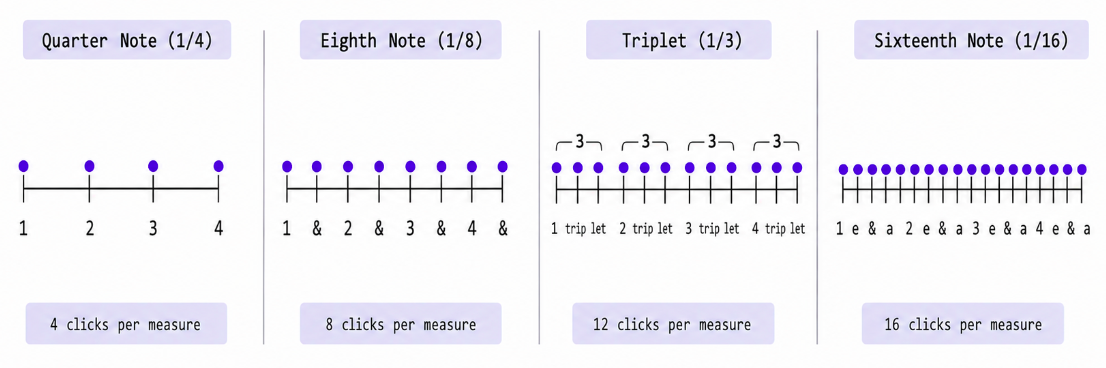
More subdivision fills in the space between beats, letting you hear exactly where each note belongs.
Using the Accent Feature to Clarify Measure Boundaries
When all clicks sound identical, it can be hard to tell where a new measure begins — especially when practicing long phrases that span many measures. Losing track of measure boundaries makes your sense of meter fuzzy.
Turning on the Accent feature in MusicalBoard Online Metronome causes the first beat of each measure (the downbeat) to sound at 1200 Hz as an emphasized click, while the remaining beats click at 800 Hz. The tonal difference makes the measure structure immediately intuitive.
In 3/4 time with accents on, the "strong-weak-weak-strong-weak-weak" pattern becomes clear. This is especially useful for practicing waltz and folk songs where the three-beat feel is central. In 4/4 time, the "strong-weak-weak-weak" pattern helps internalize the downbeat sensation.
A good habit is to use the accent feature while first learning the meter of a passage, then turn it off once the structure is internalized. Being able to recognize measure boundaries accurately even without accents is a sign that your internal meter has matured another level.
Using Time Signatures
Setting the metronome to match the time signature of the piece you are practicing is fundamental — yet far fewer students do this accurately than you might expect. Practicing a 6/8 piece with a 4/4 setting produces click patterns that do not match the actual groove of the song.
MusicalBoard Online Metronome supports six time signatures: 4/4, 3/4, 2/4, 6/8, 9/8, and 12/8. In 6/8, one measure contains six eighth notes and is typically felt in two (a compound duple meter). 9/8 is compound triple and 12/8 is compound quadruple. When practicing classical pieces, triple-meter folk songs, or 6/8 ballads, setting the correct time signature makes the metronome pulse match the song's natural heartbeat.
Turning Off the Metronome to Check
The final step that is most often skipped in metronome practice is "practice once with the metronome off." This step matters because when the click is running you cannot easily tell whether you are relying on the external click to stay in time or whether the beat is actually sounding internally.
Play through the passage with the metronome off, then turn it back on and compare. If the tempos align closely in both states, your internal pulse is forming steadily. If the tempo drifts once the click is off, you are still dependent on external support — more repetition is needed.
Using Singing Recorder alongside makes this comparison more concrete. Record a passage with the metronome running, then immediately record the same passage with it off. Playing both recordings back lets you hear the difference in rhythmic stability clearly.
MusicalBoard Online Metronome: Feature Overview
MusicalBoard's Online Metronome runs in the browser with no installation required. No microphone is needed either. Here is a feature-by-feature overview.
BPM setting: Range is 30–300. Fine-tune with the −5, −1, +1, and +5 buttons. Slow practice tends to use 30–60 BPM; ballads 60–100; pop songs 100–140.
Tap tempo: Tapping the BPM number display calculates the average interval between taps and sets the BPM accordingly. Tap along while listening to the backing track of the piece you want to practice to quickly find its exact BPM.
Time signature selection: Choose from 4/4, 3/4, 2/4, 6/8, 9/8, and 12/8. Setting this to match the piece you are practicing ensures that measure-boundary accents fire correctly.
Subdivision setting: Choose from Quarter (1/4), Eighth (1/8), Triplet (1/3), and Sixteenth (1/16). The default is quarter note; switch to eighth or sixteenth for precision rhythm work.
Accent toggle: When on, the first beat of each measure clicks at 1200 Hz (emphasized) and remaining beats at 800 Hz (normal). Useful for internalizing measure structure.
Sound toggle: Mutes all click sounds entirely. Useful for visual beat-checking or for practicing silently before turning the click back on to compare.
Settings auto-save: BPM, time signature, subdivision, and accent settings are saved to the browser's localStorage. Your last settings are preserved across page refreshes and future visits.
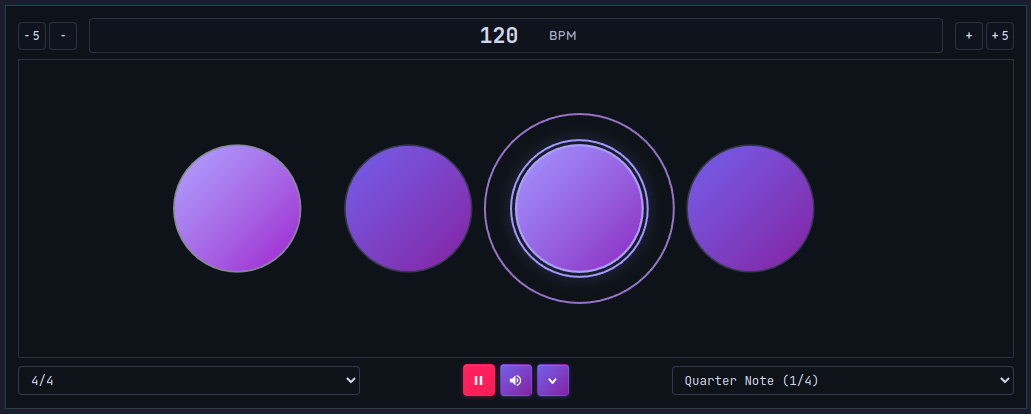
MusicalBoard Online Metronome — BPM control, time signature, subdivision, and accent, all accessible directly in the browser.
Practicing with MusicalBoard Online Metronome
Once you are comfortable using the metronome, combining it with other MusicalBoard tools multiplies the effect.
The combination most recommended for singers is opening Online Metronome alongside Vocal Pitch Monitor. The metronome handles rhythm; Vocal Pitch Monitor visualizes pitch. Using both simultaneously during slow long-tone practice lets you see at a glance how stably your pitch holds within each beat. It also lets you spot the BPM at which your pitch starts to wobble during fast phrases.
A concrete example of a practice flow:
- Open Online Metronome at 72 BPM, 4/4 time, with accent on.
- Open Vocal Pitch Monitor in the same window and allow microphone access.
- Choose one phrase to work on and repeat it ten times at 72 BPM.
- If the pitch graph shows unstable notes, drill just those notes.
- Raise by 5 BPM to 77 BPM and repeat.
- Once the target tempo is reached, turn off the metronome and record with Singing Recorder.
- Play back the recording alongside the pitch graph to identify any remaining issues.
This entire flow runs in a single browser window with no installation or account required. There is no tab-switching overhead — just practice.