
Most people have a rough sense of what BPM is, but answering "what's the BPM of this song?" on the spot is harder than it sounds. Before you can load the audio file into a DAW or open a dedicated analysis app, you're usually just guessing. The thing is, there's a way to figure out BPM fairly accurately without any extra equipment. That method is Tap Tempo. This guide covers everything from using your body to feel the beat, to how tap tempo works under the hood, tips for getting more accurate readings, and how to use it in practice with the MusicalBoard Online Metronome.
BPM — A Quick Recap
BPM stands for Beats Per Minute — it tells you how many beats fall in one minute. For a deeper dive, the Complete Guide to BPM covers it in full; here we'll just touch the basics. At 60 BPM, one beat falls every second. At 120 BPM, one beat falls every 0.5 seconds. The key thing to understand is that this number is more than just a speed label. Even at the same 120 BPM, 4/4 and 6/8 feel completely different, and the perceived tempo shifts depending on which note value counts as one beat. That's why pinning down BPM accurately is the starting point for any song practice.
Finding BPM by Ear — Feel It in Your Body First
The most time-honored way to estimate BPM without a metronome or app is simply to use your body.
Foot Tapping and Clapping
Play the song and let yourself naturally tap your foot or clap along. When you surrender to the music, your brain will automatically lock onto the downbeat of the rhythm. The key watch-out here is to match the song's "felt beat." With fast songs you might unconsciously tap twice as fast as the actual beat, and with slow songs you might move at half speed. The rate at which your foot falls is the clue to the BPM.
Counting in Your Head
While tapping your foot, count "one, two, three, four" out loud or in your head. If cycling back to "one" at the end of a measure feels natural, the song is likely in 4/4. If the cycle ends on "one, two, three," it's probably 3/4. Identifying the meter structure first makes BPM measurement much easier.
The 60-Second Count Method
This is the most primitive method but it works. Set a timer for 60 seconds, then tap on a desk in time with the music and count the taps. The total count when the timer ends is the BPM. It's simple, but accuracy is low and it's cumbersome. Tap tempo automates this entire process.
How Tap Tempo Works — Understanding the Math
Tap tempo is built on a simple principle. Each time you tap a button in time with the beat, the time interval (in milliseconds, ms) between each tap is recorded. The average of those intervals is then fed into the following formula:
BPM = 60,000 ÷ average interval (ms)
For example, if the average interval between taps is 500ms, that gives 60,000 ÷ 500 = 120 BPM. At 600ms it's 100 BPM; at 400ms it's 150 BPM.
Why You Need to Tap Multiple Times
The MusicalBoard Online Metronome stores the last five tap timestamps, giving at most four intervals for its rolling average. Two taps provide one interval; five provide four. Once another tap arrives, the oldest timestamp drops out. Continuing to tap lets early mistakes leave the buffer, but it does not average all eight or ten taps of a longer run.
The 3-Second Reset Timer
If more than 3 seconds pass between taps, the measurement resets automatically. In other words, if you stop tapping and start again, the previous tap history is cleared and the count starts fresh. This means you don't need to manually hit a reset button when switching to a different song or starting a new measurement.
Practical Tips for More Accurate Tap Tempo
Because tap tempo is such a simple mechanism, a little care goes a long way toward improving accuracy.
Tap at Least 4 Times
Tap several consecutive beats until the displayed value settles. Five taps fill the buffer with four intervals. Continuing for eight or ten beats is useful because your finger may settle into the pulse, but only the latest four intervals contribute to the displayed BPM.
Tap Every Beat
Tap every beat, not only the first beat of each bar. In 4/4, count “one, two, three, four” and tap on all four quarter-note beats. You can start on a downbeat to orient yourself, then keep tapping through the bar. Tapping only the first beat makes the tool measure bars per minute: a 120 BPM song in 4/4 would read 30 BPM. For 6/8, this tool clicks six eighth-note slots per bar, so tap the eighth-note pulse or convert a dotted-quarter tempo by multiplying it by three.
Focus on the Rhythm Instruments
If the song has drums or bass, lock onto those instead of the melody. Melodies often ornament or delay beats, making it tricky to identify the exact beat position. Drum kicks and snares, and the rhythmic pulse of the bassline, tend to sit right on the beat.
Sync Your Body Before You Tap
Listen to a few measures first and let yourself nod your head or tap your foot to internalize the rhythm before you start tapping the button. If you jump in and tap the moment the song starts, you're more likely to lock onto the wrong beat at the beginning.
Verify the Result After Tapping
After tapping, play the metronome at that BPM and see how it lines up with the song. If the click falls exactly on the beat, you've nailed it. If it's slightly off, use the ±1 or ±5 buttons to fine-tune.
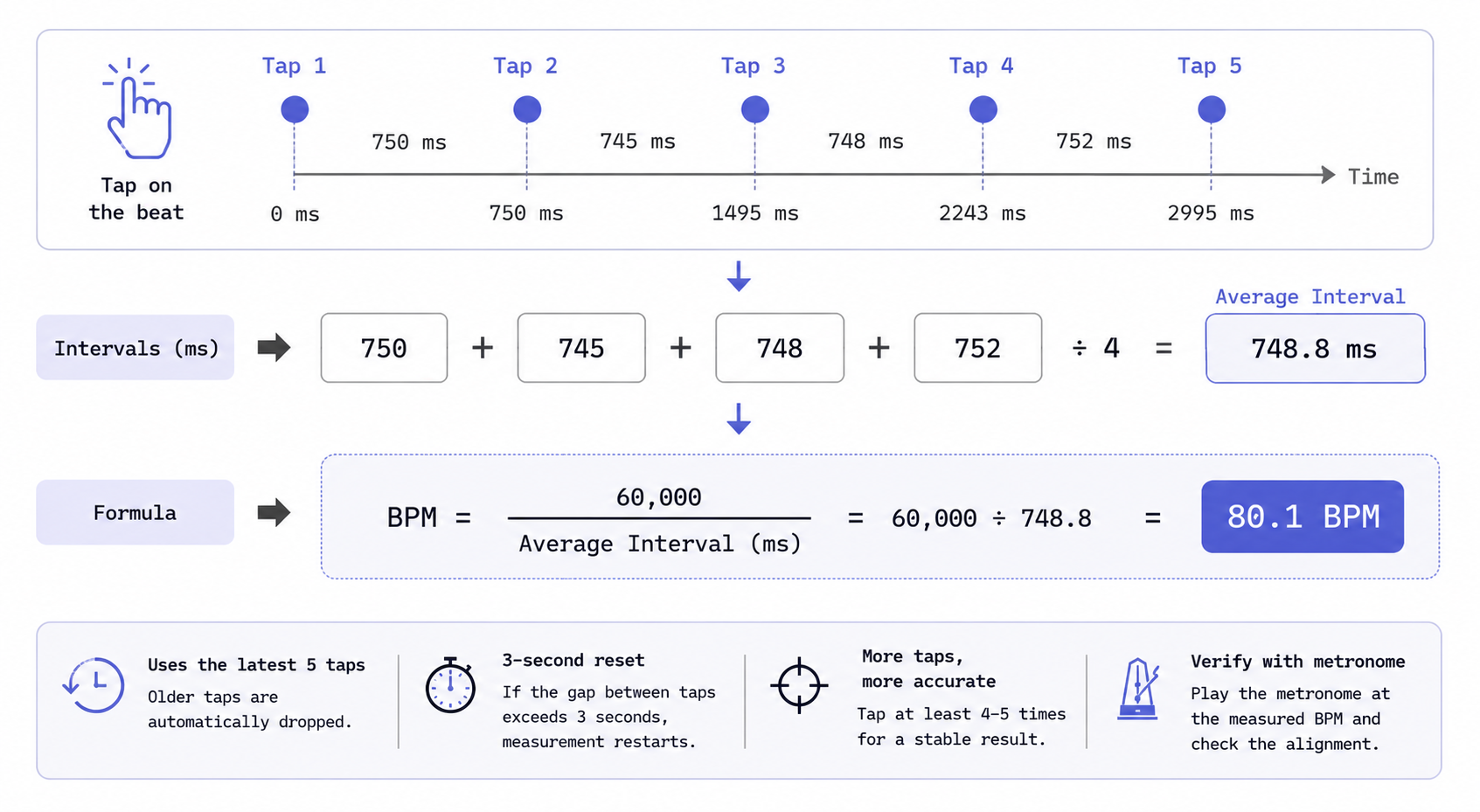
Dividing 60,000 by the average of the latest four tap intervals gives you the BPM once five timestamps fill the buffer. Continuing to tap replaces older intervals; it does not guarantee greater accuracy.
Real-World Tap Tempo Scenarios
Scenario 1 — Practicing a Pop Ballad
You want to practice a ballad but do not know the BPM. In 4/4, tap five consecutive quarter-note beats. The four intervals are 750 ms, 745 ms, 748 ms, and 752 ms. Their average is 748.75 ms, so 60,000 ÷ 748.75 ≈ 80.13 BPM and the display rounds to 80 BPM. Start the click and check it against several bars of the song.
Scenario 2 — A Fast K-Pop Track
You are practicing a fast K-pop track. Your first two taps are rushed. Keep tapping consecutive beats: as those timestamps leave the five-tap buffer, the average reflects only the latest four intervals. Once it settles around 128 BPM, play the click and verify that it stays aligned rather than trusting a single reading.
Scenario 3 — A Jazz Track with an Ambiguous Feel
In a swinging jazz track, you're not sure which beat is the downbeat. Instead of focusing on the hi-hat pattern, you lock onto the moment the bass falls. The result: 92 BPM. Setting the metronome to 4/4 at this BPM and playing it back aligns well with the feel of the song.
Using Tap Tempo in the MusicalBoard Online Metronome
Using tap tempo in the Online Metronome is straightforward.
How to tap: Click (or tap) directly on the BPM number display area in the center of the screen. Mouse clicks and touch both work. Starting from the second tap, a BPM value is calculated and displayed, and it becomes more stable with each tap.
Feature details:
- BPM range: Supports 30–300 BPM. Values calculated from tapping that fall outside this range are not applied.
- Fine adjustment: After tapping, use the ±1 or ±5 buttons to make precise adjustments.
- Time signature selection: Choose from 4/4, 3/4, 2/4, 6/8, 9/8, and 12/8. Changing the time signature after tapping does not reset the BPM.
- Subdivide: Choose Off, ×2, ×3, or ×4. The tool uses the top number of the time signature as the number of beat slots per bar; Off gives one click per slot, while ×2/×3/×4 split each slot into two, three, or four equal clicks. The labels describe how many parts each slot is divided into, not quarter or eighth notes by name.
- Accent: When on, clicks fall into three tiers: the first beat of the bar is loudest and highest (about 1200 Hz), the start of every other beat slot (the first click in each slot) is in the middle (about 800 Hz), and subdivision clicks inside a slot are quieter and lower (about 580 Hz). With Accent off, the downbeat uses the same tier as the other beat starts.
- Settings saved: BPM, time signature, Subdivide, and accent are all saved automatically to localStorage and persist after you close and reopen the browser.
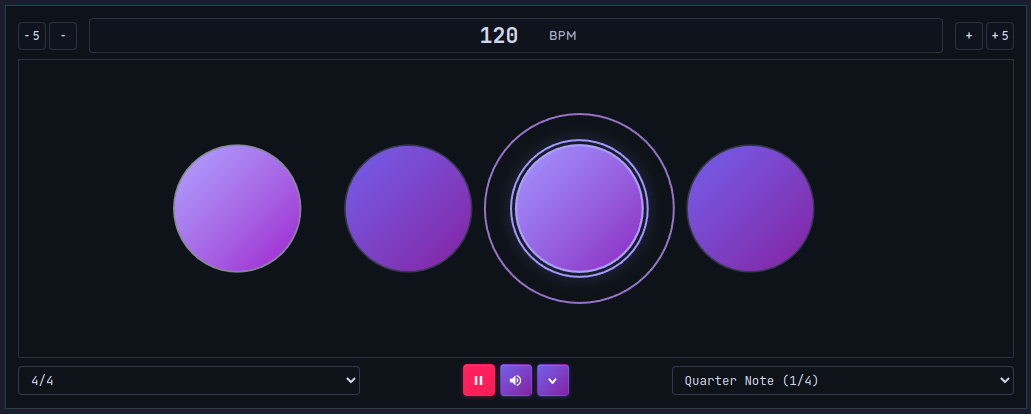
Click the BPM number display area in time with the beat and tap tempo calculates the BPM automatically.
The Relationship Between Tap Tempo and Time Signature
BPM and time signature are often confused, but they describe different things. BPM is speed; time signature is structure. Once you've found the BPM with tap tempo, you also need to identify the time signature.
Tap Tempo Can't Tell You the Time Signature
Tap tempo only measures the speed of the beat — it doesn't tell you how many beats are in a measure. For example, tapping along to a waltz will give you a BPM, but the fact that it's in 3/4 is something you have to confirm by ear.
How to Identify the Time Signature
Listen to the song and count "one, two, three, four." If "one" comes back around every 4 counts, it's 4/4; every 3 counts means 3/4; every 6 could be 6/8. 6/8 and 3/4 can sound similar and be easy to confuse: 6/8 feels like two groups of three (strong-weak-weak-strong-weak-weak), while 3/4 feels like each beat is equally spaced. For a detailed breakdown of time signatures, see the Complete Guide to Time Signatures.
Getting the Time Signature Right Changes the Click
When you set the correct time signature in the Online Metronome, the position of the accent click changes. The accent click lands in a different place when set to 6/8 versus 4/4. Practicing with the wrong time signature means the click runs counter to the musical flow — which is more confusing than helpful.
After Tap Tempo — How to Practice
Once you know the BPM, it's time to set your practice tempo. The core principle is to start at 20–30% slower than the target BPM.
For example, if the song is at 120 BPM, start practicing at 84–96 BPM. Once your pitch and articulation are accurate at that speed, increase by 5 BPM. This method is effective for building muscle memory and ensures that accuracy holds up at faster tempos.
If you also want to check your pitch, keep Vocal Pitch Monitor open alongside the metronome. Singing in time with the click while watching the pitch graph lets you see at a glance exactly which beat your intonation wavers on.
Practicing with the MusicalBoard Online Metronome
The Online Metronome runs directly in your browser — no installation needed. Use tap tempo to find the song's BPM, set the time signature, and use Subdivide to train rhythmic precision on a finer grid. Here's the recommended practice flow:
- Play the song you want to practice and tap the BPM display area to find the BPM.
- Identify the song's time signature by ear and set it in the metronome.
- Start at a tempo 20–30% below the calculated BPM.
- Once your pitch and articulation are stable, increase by 5 BPM until you reach the target.
- Open Vocal Pitch Monitor alongside to monitor pitch stability in real time.
Make good use of the Accent feature too. Hearing the downbeat clearly helps the structure of each measure become instinctive in your body. For fast songs, ×2 or ×4 gives you a finer sense of where each rhythmic position falls inside each beat slot.