
If you have ever loaded a favorite song into a pitch monitor to follow the singer’s intonation, you have probably seen the line behave strangely. It tracks the melody for a phrase, then suddenly drops two octaves to the bass, and the moment the singer takes a breath it climbs onto a guitar riff. Nothing is broken. Pitch detection looks for the clearest repeating pattern in each short slice of sound, and in a song with accompaniment that pattern is not always the voice. If you separate the lead vocal first, you hand the detector a signal where the voice is the main thing left. Vocal Isolator does this inside your browser and does not send the file to a server. This article walks through why the line jumps, how to judge whether an isolated vocal is good enough to practice against, and what the vocal range setting really does.
Pitch detection follows the clearest pitch, not the singer
A pitch detector does not know what a voice is. Every few hundredths of a second it cuts out a short window and asks only, “Which repeating period is strongest here?” The standard way to answer that is autocorrelation: overlay the slice of sound on a slightly delayed copy of itself and find the delay at which the two line up best. That delay is one period, and its inverse is the fundamental frequency shown on screen as a note name. Wikipedia’s Pitch detection algorithm article summarizes how the different methods compare, and how MusicalBoard measures pitch in the browser is covered separately in How Browser-Based Pitch Detection Works.
In a file with only a voice and no accompaniment, the strongest period is almost always the voice. In a full mix, though, every pitched instrument offers its own period at the same time, and the detector reports whichever one wins in that moment. So the pitch trace splits into two kinds of moments:
- Moments the voice wins. A vowel held at a comfortable volume over a quiet accompaniment. The line follows the melody.
- Moments an instrument wins. Gaps between phrases, soft breathy syllables, consonants, and short vocal notes over a long bass note. The line moves to the bass, a guitar, or a synth pad.
The most common culprit is the bass. A bass note is steady, usually loud in modern mixes, and has a very regular waveform, so the detector latches onto it easily. On top of that, its harmonics overlap the singing range. Take an A1 on the bass (55 Hz): its second harmonic lands on A2 (110 Hz) and its third near E3 (about 165 Hz) — a register where many male vocals sit. Errors where the line falls or rises by exactly one octave mostly come from this overlap.
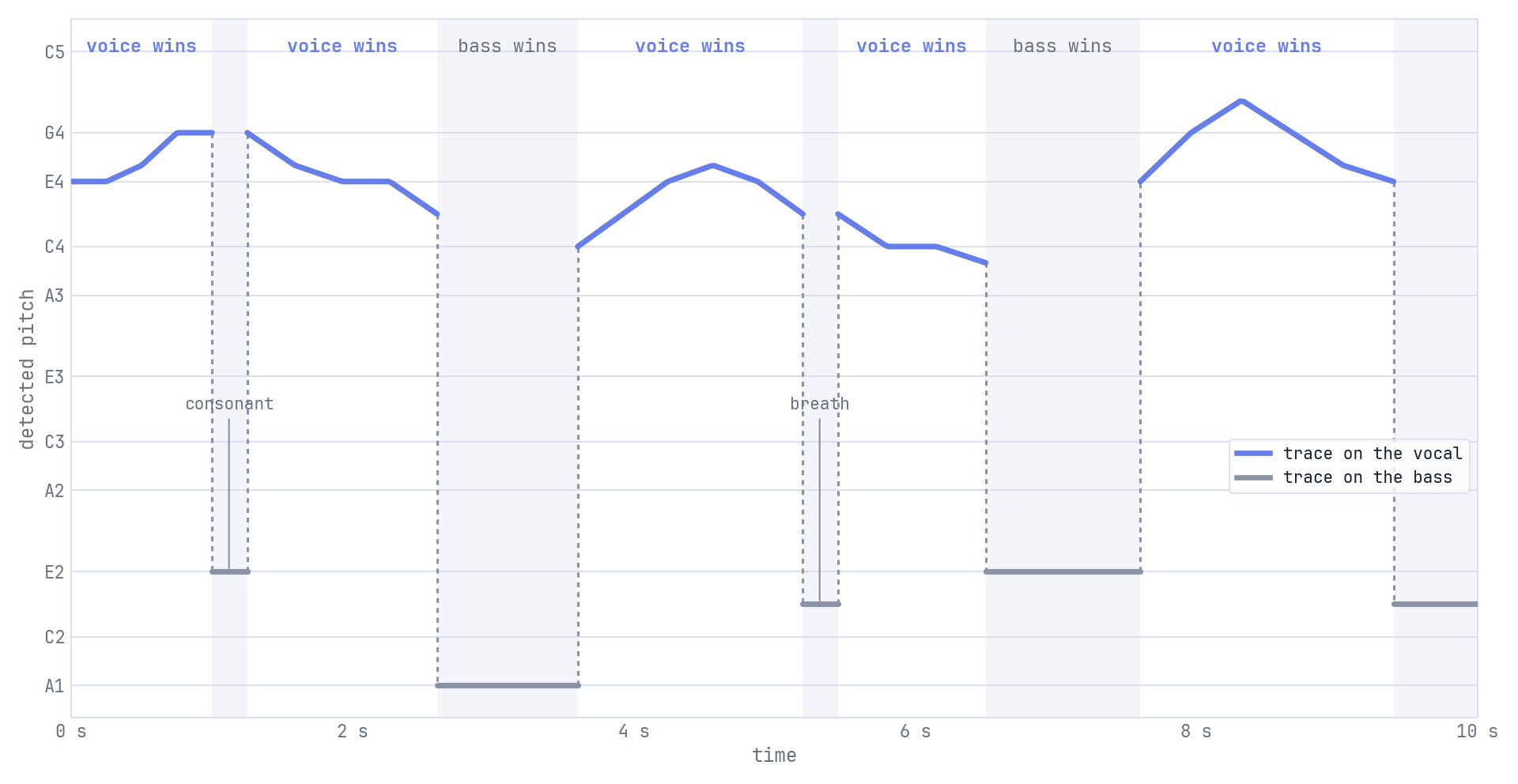
In a mixed song, the pitch line belongs to whatever sound is clearest at that moment — often the voice during phrases and the bass in between.
The problem is that on the original song’s graph you cannot tell which dips are the singer going low and which are the detector switching to an instrument. Any intonation lesson you draw from that graph has noise mixed in. Separating the vocal does not make the detector smarter. It clears most of the competition out of the way.
“Sounds clean” is not the same as “good enough for intonation practice”
When people listen to the result of source separation, most put on the chorus and judge by ear. The voice is up front and the drums are gone, so it sounds convincing. For intonation practice, though, that is the wrong place to listen. In loud sung phrases the voice wins anyway. The real trouble spots are the gaps between phrases, because that is exactly where the detector goes looking for something else to report.
That is precisely what Vocal Isolator checks. After processing, it measures two things in the isolated file: the level of the sung sections, and the level of the gaps where the original song is still playing but no voice is found. If the gaps are within 20 dB of the sung sections — meaning that much instrument is left — it treats the leftover as able to steal the pitch line and shows backing still audible on the result card. If the gaps are quieter than that, it shows good for pitch practice. Twenty decibels down means the leftover sound is about one tenth of the sung level in amplitude. Below that, the leftover instruments rarely produce a steady enough pitch to take over the line.
Two other one-line results can appear ahead of these. A clip shorter than three seconds is too short to separate. A mono mix, where the left and right channels are nearly identical, gets a warning that separation quality may be low. This is common in older recordings and phone videos. The model has no left–right difference to work with; for why stereo placement helps, see the Stereophonic sound article.
The result card also shows two numbers. It helps to know what each one tells you and what it does not.
- Vocal level compares the overall level of the isolated file with the original. −6 dB means the isolated vocal is about half the level of the full song, which is expected since the band has been taken out.
- Removed energy compares the level of what was taken out (the original minus the isolated vocal) with the original. The closer it is to 0 dB, the more of the song’s sound was not voice.
Neither number tells you whether the gaps are quiet. That is why there is a separate one-line result, and why you should read that line before the numbers.
Two examples: a quiet vocal that works, a big cut that does not
Here are two separation results that come out the opposite of what you might expect.
Example 1 — Vocal level −7 dB, quiet gaps
A ballad with piano, soft strings, and a lead vocal mixed fairly loud. After separation, Vocal level is around −7 dB and Removed energy around −5 dB. On the numbers alone, the isolated vocal is much quieter than the original and not much was removed. But the piano rang softly under the voice and stopped when the singer stopped, and the model took it out cleanly. The gaps are close to silent, so the card shows good for pitch practice.
On the pitch roadmap, the isolated line stays on the melody through the whole verse. Where the line goes down, the singer really went down. Even though the numbers look modest, this is a file worth using as a practice reference.
Example 2 — Removed energy −2 dB, guitar left in the gaps
A rock song with distorted rhythm guitars spread wide left and right, bass, drums, and a vocal buried between the guitars. Removed energy is near −2 dB. That means most of the song was taken out, so the result looks good. But between every phrase the guitars hold power chords, and some of that survived in the isolated file at a level close to the sung sections. The card shows backing still audible.
On the pitch roadmap, the isolated line still jumps in every gap, though less than on the original. As a result, where the singer lands the first note of each line gets blurred. The isolated file from this song is useful for hearing the vocal, but not for grading intonation.
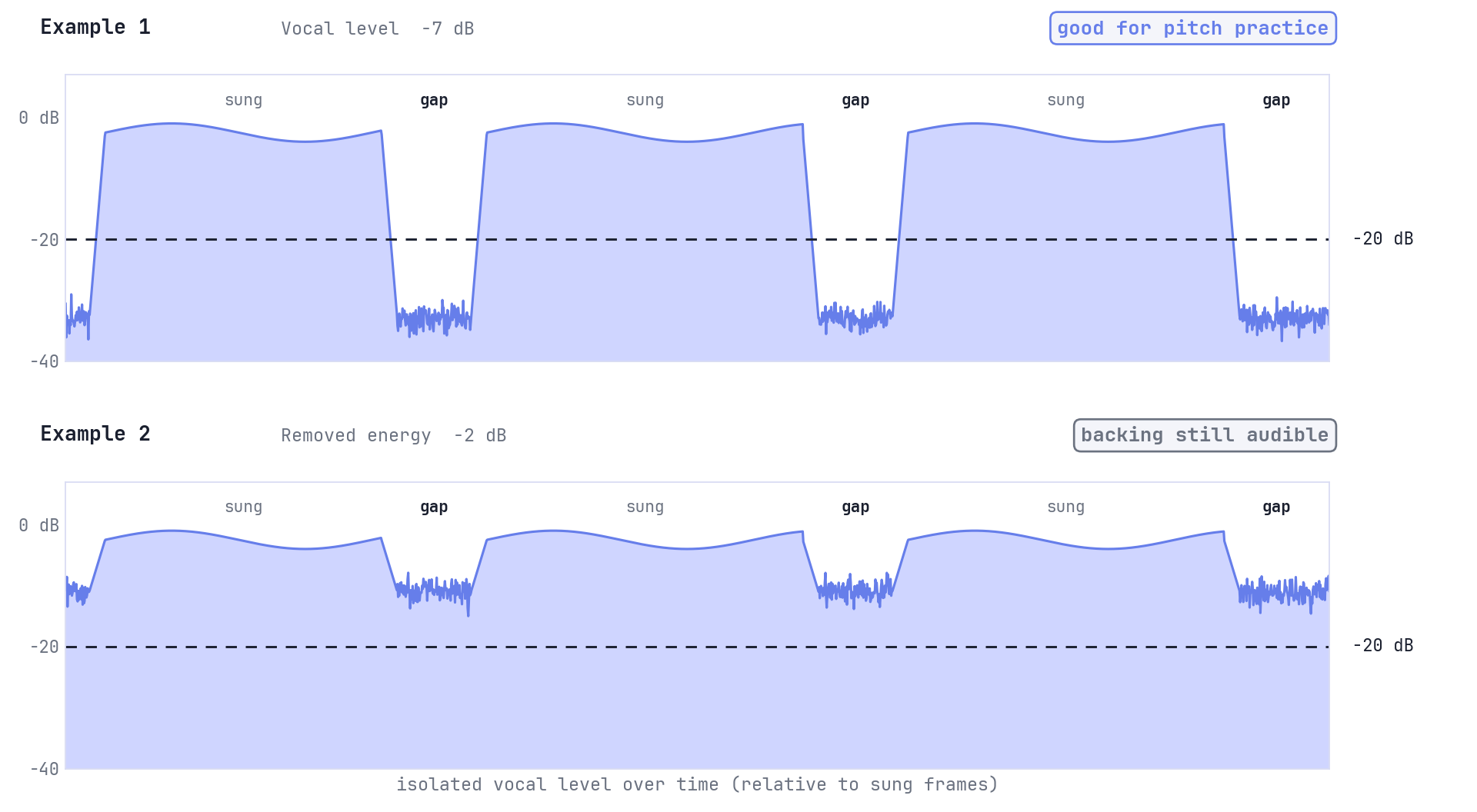
The verdict depends not on how much was removed overall, but on how quiet the gaps are compared with the sung sections.
What to do in each case is simple. In Example 1, use the isolated vocal as your practice reference as it is. In Example 2, it is better to try again on a thinner part of the arrangement — the verse instead of the chorus, for example — or to accept that this song will not give you a clean pitch reference. Running the same audio again gives the same result from the model.
The vocal range setting: when it helps, and what it does not do
Before processing you can choose the singer’s range: Auto, one of six range presets from Bass to Soprano, or a Custom range you set yourself. Choosing a range changes two things.
- Pitch candidates are limited. Only pitches inside the chosen range, widened by two semitones above and below, can become the pitch line. A guitar note an octave above the singer or a bass note far below can no longer become the line.
- Low rumble below the lowest note is removed. A high-pass filter starts three semitones below the bottom of the range (it never goes below 60 Hz). For the Tenor preset (C3–C5) that is about 110 Hz, which removes most of the bass guitar’s fundamentals and the body of the kick drum without touching the voice.
There are also things the range setting does not do. It does not speed up processing, and it does not make the separation itself better. The separation model runs exactly the same way; the range is applied only to its result. If you change the range after processing and press Apply new range, the model does not run again — only the filter and the pitch line are recalculated.
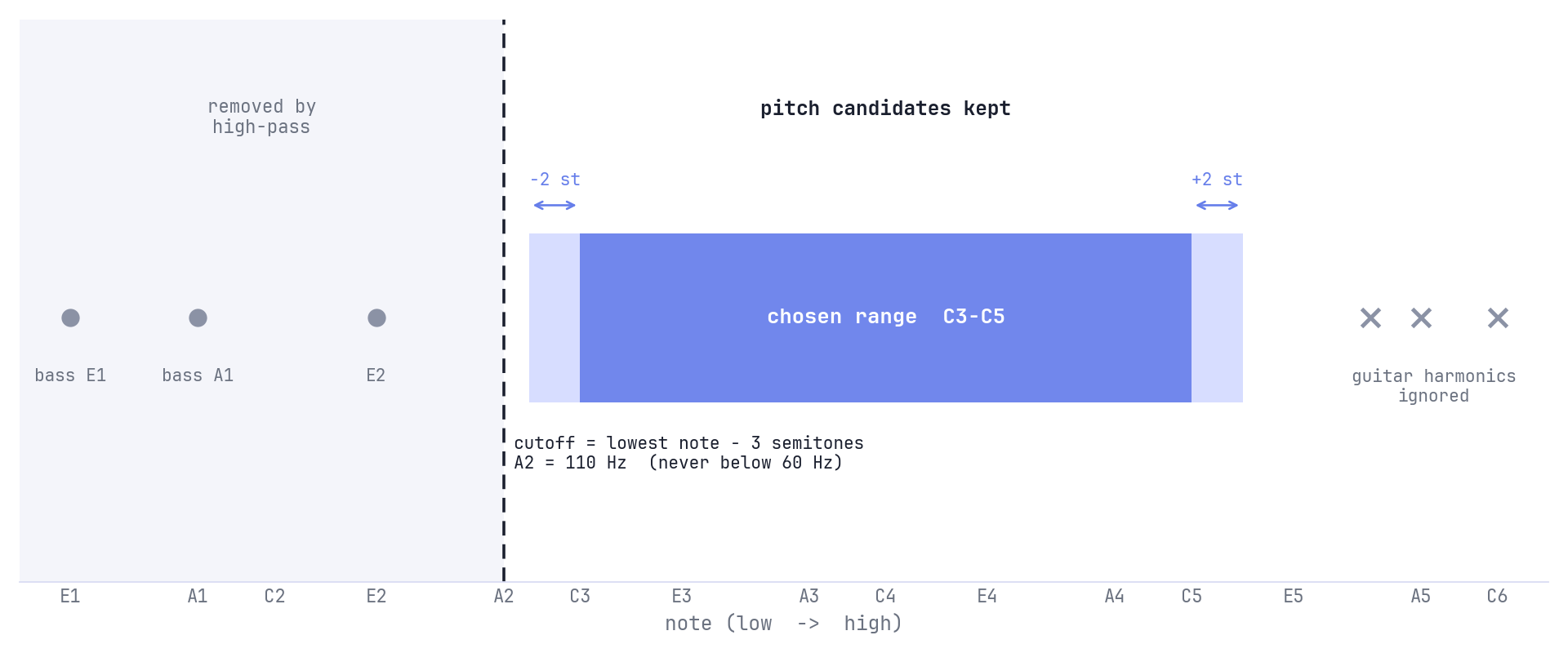
The range setting filters the result: low sound below the cutoff is removed, and pitches outside the band cannot become the pitch line.
So the range setting is a fix for one specific problem: leftover bass stealing the pitch. If the isolated line keeps dropping one or two octaves below the melody, choose a range. If, on the other hand, the gaps are full of guitar in the same register as the voice, choosing a range will not help much, because that guitar sits inside the range.
Two cautions. First, what you choose is the range of the singer in this file, not your own. Even if you are a baritone practicing a soprano’s song, choose Soprano or Auto. Second, if 30% or more of the sung sections fall outside the range you chose, the result card warns you and shows a Switch to Auto button. That usually means the preset was a guess. If you are not sure, leave it on Auto, which estimates the range directly from the isolated vocal. If you need a starting point for Custom, Wikipedia’s Vocal range article lists the typical span of each voice type.
A short routine before you practice with a song
- Open Vocal Isolator, upload only 30–60 seconds of the song — about one verse and one chorus — and choose Separate vocal from mix.
- Leave the range on Auto for the first run. After processing, read the one-line result before the numbers.
- If it says good for pitch practice, compare the original line and the isolated line on the pitch roadmap. Where the two lines disagree, the original line was following an instrument.
- If the isolated line still drops toward the bass, choose the singer’s range and press Apply new range. If it says backing still audible, switch to a part of the song with a thinner arrangement.
- Once the line looks right, save the isolated vocal as a take and sing along one phrase at a time in Vocal Pitch Monitor.
The tool’s separation model is based on KUIELab’s MDX-Net. It is described in the paper KUIELab-MDX-Net: A Two-Stream Neural Network for Music Demixing and was one of the systems entered in the Music Demixing Challenge 2021. It runs on your own device with WebAssembly. The model (about 30 MB) is downloaded once and kept in your browser, and your audio is not sent anywhere. The same run also produces the instrumental — the song with the vocal removed — so if you want to sing over it, you can use it as in Recording a Vocal Take with a Backing Track in Your Browser.
What this tool does and does not do
Vocal Isolator is a practice aid. On a densely mixed, finished master it does not replace iZotope RX or a paid stem separation service. Some reverb tails, doubled vocals, and very sharp sibilance will always end up in the wrong file. For intonation practice, quiet gaps are enough — and that is exactly what the one-line result checks.
Use it only on recordings you have the right to edit: takes you recorded yourself, songs you have licensed, or material a teacher or label shared for practice. Isolating a commercial track to study privately at home is a different matter from publishing the result.
Further reading
- Why You Sing Flat — what to do once you can trust the line and the remaining dips really are yours
- How Browser-Based Pitch Detection Works — the detection side in more depth
- Vocal Isolator tool page — modes, result card fields, privacy, and limits
A pitch line is only as honest as the sound underneath it. On a mixed song, every jump raises the question, “Was that the singer, or the bass?” Isolating the vocal and checking that the gaps are quiet answers most of those questions — and the dips that remain become the parts you practice.