
A correction slider is easier to understand when you can compare a known input with its output. We generated a tone 35 cents above A3, imported it into MusicalBoard’s Auto-Tune, and downloaded the result with three settings. Moderate brought it closer to A3, while Hard brought the steady portion close to A3. Strength 0 left its measured pitch unchanged.
This was a synthetic signal experiment. It does not show a singer improving, and it does not establish how natural a corrected vocal sounds. The point is to make one part of the tool’s behavior inspectable, using files you can download and repeat the test with.
Input and recording conditions
A3 is 220 Hz at A4 = 440 Hz. Moving it up by 35 cents gives 220 × 2^(35/1200), approximately 224.493 Hz. The generated signal also contains second and third harmonics, with relative amplitudes 0.35 and 0.15. It lasts three seconds, peaks at 0.4 full scale, and uses 20 ms fades. There is no breath noise, vibrato, accompaniment, or room reverberation.
The input is a 48 kHz, 16-bit mono WAV. We ran the test in Chromium on Linux on 16 October 2026. The browser’s processing and downloaded WAVs used 44.1 kHz in this run. That difference is why the input and corrected files need not have the same byte size even when correction is off.
For each pass, we used a fresh browser session, uploaded the same source, chose Chromatic, applied the settings below, and downloaded WAV with Download Auto-Tune. Chromatic allows every semitone, so the nearest permitted note for this input is A3. The key does not restrict notes in this scale.
What the two measurements say
We recorded the tool’s average distance to the scale shown in the interface (before and after correction). Separately, we measured the downloaded file’s fundamental in the central second with a standard spectral analysis around A3 and converted that frequency to signed cents relative to 220 Hz.
| Setting | Strength / speed / tolerance | App average, before → after | Central-second FFT pitch | Signed offset from A3 |
|---|---|---|---|---|
| Correction off | 0% / 55% / 25¢ | 37¢ → 37¢ | 224.493 Hz | +35.00¢ |
| Moderate (Default) | 75% / 55% / 25¢ | 37¢ → 11¢ | 222.313 Hz | +18.11¢ |
| Hard | 100% / 0% / 0¢ | 37¢ → 1¢ | 219.729 Hz | −2.13¢ |
The extra decimal places help reproduce the calculation; they are not a claim of calibrated acoustic accuracy. These are measurements of generated digital files in one software setup.
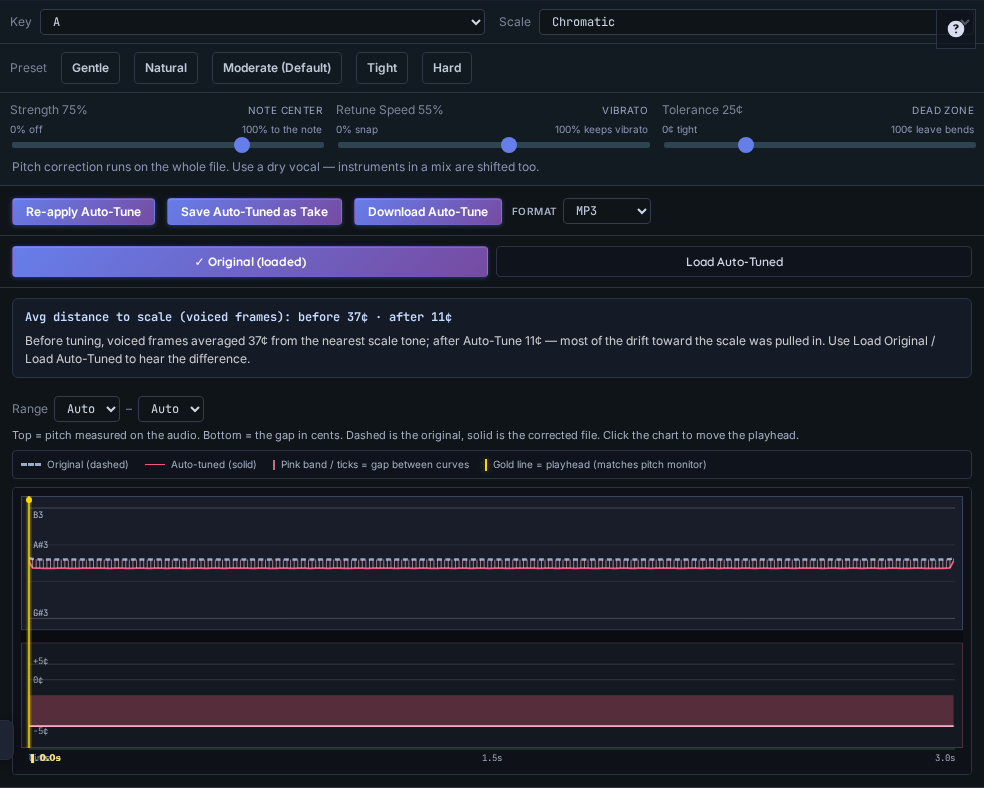
Actual Auto-Tune settings and roadmap from the Moderate test, showing the app’s 37-cent before and 11-cent after averages
Why 11 cents and 18 cents are both in the table
The app’s number is a mean of distances from its estimated pitches to the nearest scale tone, across voiced frames. It is unsigned and spans the analyzed take. Our independent measurement locates a prominent spectral peak in a single central window, then reports a signed offset from A3.
Those are different estimators, time windows, and summaries. The source itself demonstrates the difference: the generated and FFT-measured pitch is +35¢, while the app reports an average of 37¢. After resynthesis, the disagreement is larger for Moderate. We are showing that disagreement rather than treating the app’s chip as ground truth.
A lower average chip therefore supports “the estimated pitch moved closer to the scale” in this example. It does not mean every moment is exactly 11 cents sharp, or that the whole result has become more musical. If the app and an independent measurement disagree, compare their definitions before declaring either number the true pitch of every frame.
Listen and reproduce the experiment
Download the 35-cent-sharp source, Strength 0 result, Moderate result, and Hard result. Listen at a comfortable volume; these are simple electronic tones, not vocal demonstrations.
To repeat the browser steps:
- Import the source into an empty slot on Auto-Tune.
- Choose Chromatic and Moderate (Default).
- For the off pass, set Strength to 0%; leave speed and tolerance at 55% and 25¢.
- Apply and download WAV with Download Auto-Tune.
- Start a fresh session and repeat with Moderate, then Hard.
What to take into real vocal practice
Moderate is a partial correction, so a remaining offset is expected. Hard requests a stronger, faster correction; this test shows that direction of change, but not a guarantee of exact zero error. A pure, stationary tone is much easier to analyze than consonants, changing vowels, vibrato, or a noisy vocal.
On a real take, set the intended key and scale first. Listen to the same phrase in the original and corrected versions. Ask whether note centers moved usefully and whether transitions or timbre became less convincing. A cleaner pitch number cannot assess lyric timing, phrasing, breath coordination, or expression.
Keep the dry take. Controller export refers to the selected slot’s source; use Download Auto-Tune for the correction, or Save Auto-Tuned as Take before exporting that new slot. For the full workflow, see The Browser Auto-Tune Guide.
This experiment did not test human voices, live correction, formant preservation, or listener preference. It supports a specific observed result: on this source, the selected settings changed the downloaded tone’s pitch in the intended direction, and the displayed average remained an estimate with limits.