
When you save a practice take, there are two different questions: “Can I listen to it?” and “Did I keep the exact file I started with?” A file can play successfully even after conversion. That does not make it an unchanged copy.
We tested the Original option in Singing Recorder by uploading four audio files, downloading each one through the visible menu, and comparing every byte with its input file. All four matched. This is a browser test of MusicalBoard’s download path, not a listening survey or a claim about recording quality.
Updated 20 October 2026: the results below were measured on 16 October 2026, after the publication date shown above.
What we actually tested
The source was a generated tone, not a recording of a singer. It contains a 220 Hz fundamental with second and third harmonics, a peak amplitude of 0.4 full scale, and a 20 ms fade at each end. The WAV lasts three seconds and contains 48 kHz, 16-bit, mono PCM. We generated MP3, M4A/AAC, and WebM/Opus fixtures from that WAV with FFmpeg.
The test ran in Chromium on Linux on 16 October 2026. Each format used a fresh browser session so a previous take or cached settings could not affect the result.
For each file, we followed the same steps a visitor can perform:
- Open Singing Recorder and upload the fixture into empty Take A.
- Wait for local analysis and confirm the take name.
- Open Download and select Original.
- Save the downloaded file and check its extension.
- Compare the downloaded bytes with the uploaded bytes.
The comparison checked the whole file, including headers and metadata, rather than just comparing the decoded audio. If you repeat the check, matching SHA-256 checksums strongly support byte identity.
The observed results
| Uploaded fixture | Input size | Download extension | Exact byte match |
|---|---|---|---|
| WAV / PCM | 288,044 bytes | .wav | Yes |
| MP3 | 24,429 bytes | .mp3 | Yes |
| M4A / AAC | 27,769 bytes | .m4a | Yes |
| WebM / Opus | 27,139 bytes | .webm | Yes |
These sizes describe our fixtures. They are not MusicalBoard’s conversion bitrates, a format-quality ranking, or a prediction of your file size. The three compressed fixtures were encoded before upload. In this experiment, the browser preserved them rather than encoding them again.
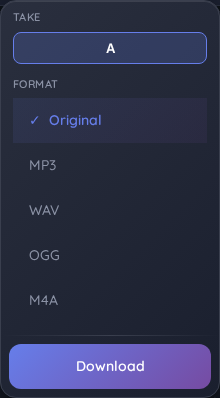
Actual MusicalBoard download menu during the test, with Original selected
Why the extension matters
A filename ending in .webm does not prove that the bytes inside are WebM. An uploaded MP3 is still an MP3 unless an encoder actually converts it. Similarly, a browser recording can use MP4/AAC rather than WebM, depending on the browser.
MusicalBoard’s Original path now checks the source container and chooses its extension accordingly. It saves the source without decoding and re-encoding it. The four successful cases above support that behavior for these inputs. They do not establish support for every possible container or codec.
This is especially useful when you want to preserve a take for later work. Keep Original as your source copy. Make a separate converted copy if a teacher, editor, or sharing service needs MP3 or WAV. Converting a compressed source to WAV does not restore detail that the earlier encoder removed.
Try the same check with your own file
The fixtures are available as WAV, MP3, M4A, and WebM. You can download one, upload it to Singing Recorder, and export Original without granting microphone access.
If you want to check your own recording, compare the two files with your operating system’s checksum tool. Comparing sound by ear alone cannot detect a changed header or a small encoding change.
Use an empty A–D slot for each import so you can keep your previous take. Choose Original in the Controller to preserve that slot’s source. If you are testing an Auto-Tune result, use Download Auto-Tune or save the corrected result to another slot first; previewing a correction does not replace a slot’s original file.
What this test leaves open
We did not record through a physical microphone or test Safari on an Apple device. Uploading an M4A/AAC fixture checks preservation of that container; it is not a substitute for testing Safari’s own recording pipeline. We also did not compare stereo imports, damaged files, or every browser decoder.
The result is narrow and useful: for these four valid files in Chromium on the date above, Original kept the actual source bytes and used the correct extension. The test does not certify perceived sound quality, microphone behavior, or converted exports.
For the difference between preservation and conversion, see Choosing an Export Format and the MediaRecorder reference.